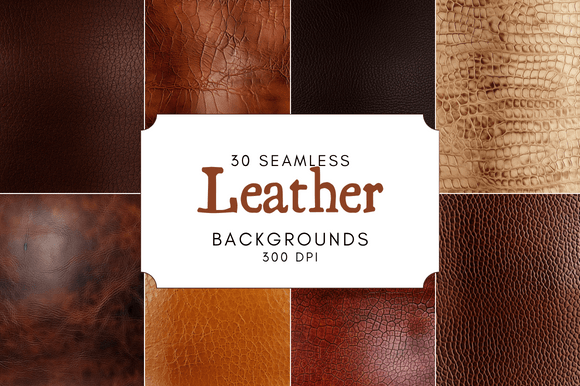
Seamless Leather Digital Paper: Your Design Foundation
There's a certain weight and history to leather that's hard to replicate. It suggests craftsmanship, durability, and a touch of luxury. In the digital world, capturing that tactile, authentic feel is a common challenge. This is where high-quality Seamless Leather Digital Paper steps in, offering a foundational design asset that brings immediate depth and character to a wide range of projects. It's not just a pattern; it's a texture that tells a story.
The Anatomy of a Premium Texture
What sets a professional-grade texture apart? It starts with the specifications. A resolution of 4090 x 4090 pixels at 300 DPI means these files are built for versatility. You can scale them for large-format print like banners or packaging without losing detail, and they remain crisp for high-resolution digital screens. The .PNG format with a seamless tile is crucial—it allows you to extend the texture infinitely across any canvas size, from a social media graphic to a full website background, without visible, awkward seams.
The visual personality of these backgrounds is rich and nuanced. You'll find variations that range from smooth, polished calfskin with subtle grain to more rugged, distressed finishes with visible patina and wear. This variety allows you to match the texture to your project's specific tone. A clean, dark brown leather can convey classic sophistication for a law firm's branding, while a weathered, tan leather might perfectly suit a vintage-inspired coffee shop menu. The "seamless" aspect ensures that the texture feels like a real, continuous material, not a tiled, digital afterthought.
Practical Applications: Beyond the Background
Thinking of these files as mere backgrounds undersells their utility. Their true value lies in their ability to integrate into your brand identity and design systems as a core element.
- Branding and Logo Design: Use a leather texture as a subtle background for a logo presentation or as a fill within a monogram. It instantly adds a layer of tactility and warmth, making a brand feel more approachable and established. This works exceptionally well for brands in lifestyle, food & beverage, artisanal goods, or any field where tradition and quality are key messages.
- Editorial and Packaging Design: For a book cover, magazine feature, or product label, a leather texture can replace a solid color to create immediate visual interest and a sense of premium quality. Imagine a cookbook with a leather-textured spine or a coffee bag label with a leather-esque background—it elevates the perceived value before the customer even engages with the content.
- Digital and Web Design: In web design, a textured background can break the monotony of flat color, adding depth to a hero section or a sidebar. For social media graphics, a leather background can make a quote or promotional post stand out in a feed, giving it a polished, intentional look that feels more like a crafted piece than a quick digital post.
The key is intentionality. A leather texture shouldn't be used randomly. It should align with the project's narrative. It’s a powerful tool for visual hierarchy, drawing the eye and anchoring design elements. When used consistently across touchpoints—from a website header to a business card—it strengthens brand recognition and builds a cohesive visual language.
Integrating Texture into Your Workflow
Adopting a new design asset requires a bit of strategy. Here’s how to make the most of a Seamless Leather Digital Paper pack:
- Evaluate the Project Fit: Before applying the texture, ask: Does this material complement my message? Leather speaks of authenticity and endurance. It might clash with a brand aiming for ultra-modern, minimalist, or playful aesthetics. For a tech startup, it could feel anachronistic, but for a bespoke tailor, it's a perfect fit.
- Test with Your Typefaces: The interaction between texture and typography is critical. A bold serif font or a sturdy sans serif font often pairs well, as they have enough presence to read clearly against a detailed background. Avoid overly delicate script fonts or intricate handwritten fonts on heavily textured leather, as legibility can suffer. The goal is a harmonious pairing where the texture supports, not competes with, your message.
- Layer with Purpose: Don't just slap the texture on a layer and call it done. Experiment with blending modes like Multiply, Overlay, or Soft Light in your design software to integrate it more naturally with underlying colors. You can also apply subtle gradients or use clipping masks to confine the texture to specific shapes, like a text box or a photo frame.
- Consider the Commercial License: Since these are digital design assets for both personal and commercial use, they can be integrated into client work, products for sale, and marketing materials. Always double-check the license agreement to ensure your intended use is covered, especially for large-scale distribution or print-on-demand products.
In practice, a designer might start a new branding project by setting the logo on a seamless leather background to immediately convey the brand's intended feel to a client. A blogger could create a series of consistent Pinterest graphics using the same leather texture, establishing a recognizable visual style. A small business owner might use it to design a cohesive set of price tags, thank you cards, and social media posts for their Etsy shop.
Ultimately, Seamless Leather Digital Paper is more than a decorative element. It's a versatile creative font for your visual toolkit—a texture that can communicate heritage, reliability, and refined taste. By choosing the right variant and applying it thoughtfully, you can transform flat designs into engaging, multi-dimensional experiences that resonate with your audience on a tactile level, even through a screen.